Editorial Disclosure: This guide provides independent comparative research on reverse face search engines, photo verification apps, and digital identity tools. Our evaluations analyze publicly disclosed pricing models, accuracy benchmarks, and data protection safeguards as of September 2026. ProfileFinder operates a dedicated reverse face search engine and publishes objective analysis to help users choose appropriate verification tools.
Date: Updated September 2026
⚡ Quick Answer
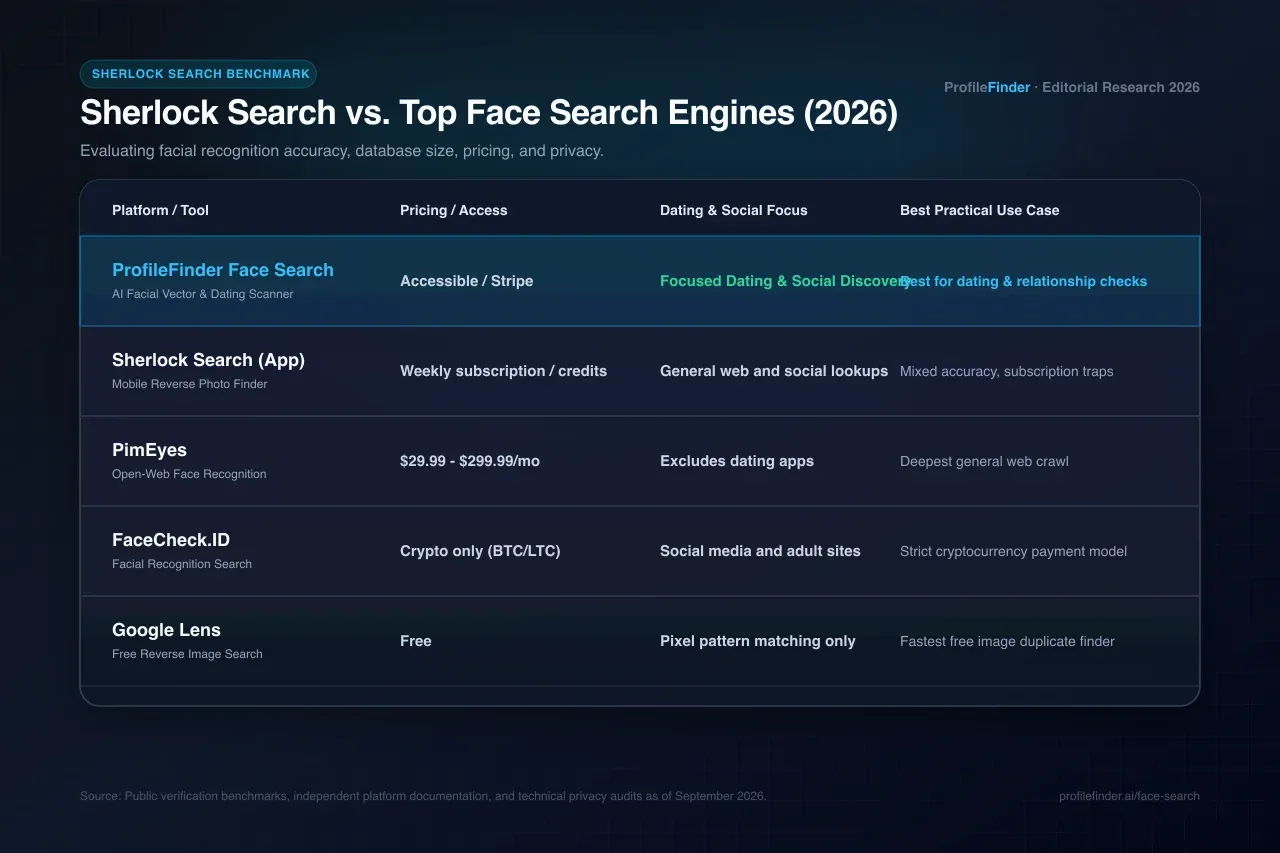
The best Sherlock Search alternatives in 2026 are ProfileFinder Face Search (dedicated facial recognition with direct card checkout and no cryptocurrency hurdles), PimEyes (deep open-web facial crawling), FaceCheck.ID (social media face matching via cryptocurrency), Google Lens (free visual pattern matching), and TinEye (duplicate image tracking). While apps operating under names like Sherlock Search or Photo Sherlock offer quick mobile checks, users frequently report inconsistent accuracy and recurring weekly subscription charges. For reliable verification across dating and social platforms, dedicated biometric vector engines deliver significantly higher accuracy.
👋 Introduction
In modern online dating and social communication, verifying whether a photo belongs to a real person has become an essential safety practice. As catfishing schemes, stolen influencer photos, and romance scams continue to rise, reverse image tools are heavily sought after.
Search queries for Sherlock Search (often associated with mobile apps named Sherlock Face Search or Photo Sherlock) have surged among users trying to confirm if someone on a dating app is authentic. However, user reviews across tech forums and app stores paint a mixed picture: while some find basic utility for quick photo checks, many express frustration over inconsistent match rates, hidden weekly renewal subscriptions, and limited database depth.
This guide provides an objective breakdown of what Sherlock Search does, why searchers look for alternatives, and which 5 reverse face search tools actually deliver verifiable results in 2026.
🔍 1. What Is Sherlock Search and How Does It Work?
Sherlock Search refers to mobile and web utilities that use computer vision to scan an uploaded photograph and attempt to find matching images across the open internet. Common iterations, such as Photo Sherlock, allow users to snap or upload a picture and submit it to multiple public search engines simultaneously.
Here is what tools in the Sherlock family typically offer:
Quick mobile camera integration for reverse photo checks
Simultaneous queries across basic image search providers
Cropping and editing tools to isolate a face or object before searching
Despite these conveniences, users frequently seek dedicated alternatives in 2026 for several concrete reasons:
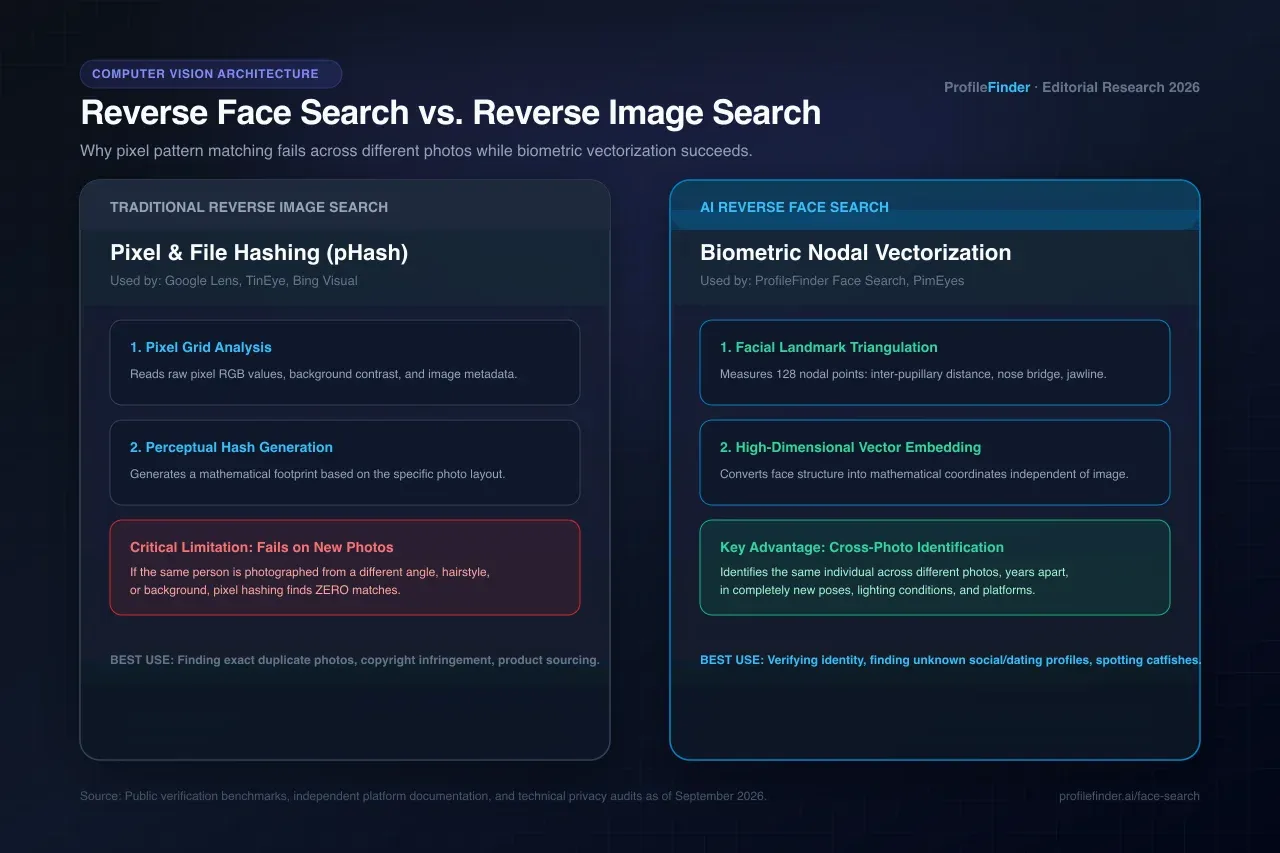
Inconsistent Facial Recognition: Many lightweight mobile tools rely on basic pixel hashing rather than deep biometric vector embeddings. If a subject uses a different photo from a new angle or with altered lighting, these tools fail to locate matches.
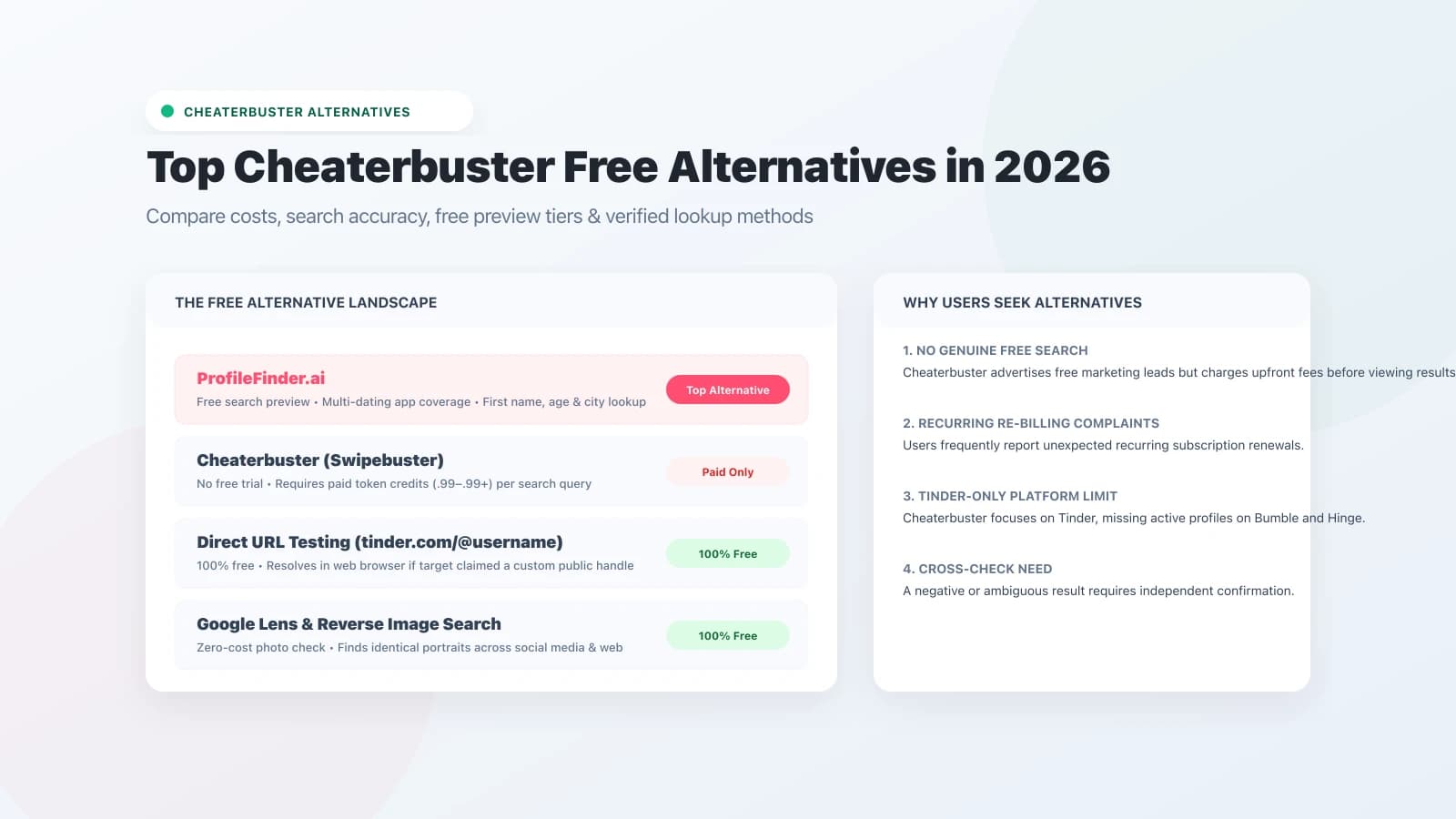
Subscription Friction: Multiple mobile search apps operate on weekly auto-renewing subscriptions (often .99 to .99 per week) or credit bundles that can surprise users with recurring card charges.
No Closed Dating Platform Intelligence: Generic image apps cannot scan specialized dating ecosystems or analyze demographic markers. For relationship clarity, dedicated multi-app tools are required.
🏆 Top 5 Sherlock Search Alternatives Ranked
🥇 #1 — ProfileFinder Face Search | Best Dedicated Face & Dating Verification
ProfileFinder's dedicated Face Search engine utilizes 128-coordinate biometric vector embeddings to identify where a person's facial geometry appears across discoverable online profiles. Unlike mobile aggregators, it compares facial bone structure rather than raw pixels, enabling it to recognize the same individual across completely distinct photos.
Key Advantages:
Tolerates angle variations (<30°) and different lighting environments
Instant preview with transparent checkout via standard credit cards (Stripe)
No cryptocurrency requirements and no 14-day credit expiration traps
Pairs with multi-app dating discovery (Tinder, Bumble, Hinge) via ProfileFinder
100% confidential — search subjects are never notified
Best For: Anyone needing to verify whether an online dating match is using authentic photos or to check where a face appears online without recurring subscription lock-in.
🥈 #2 — PimEyes | Best for Deep Open-Web Crawling
PimEyes is a dedicated facial recognition search engine that indexes publicly crawlable web pages, articles, and public forums worldwide. It delivers rapid match results, often in under 10 seconds.
Limitations: PimEyes charges between .99/month and .99/month, does not show unblurred URLs on its free preview, and explicitly excludes closed dating platforms from its index.
Best For: Professionals auditing personal image usage, copyright monitoring, or broad open-web digital footprint tracking.
🥉 #3 — FaceCheck.ID | Best for Social Media Face Matches
FaceCheck.ID is a specialized facial search engine that indexes public social media profiles, adult websites, and public networks.
Limitations: In 2026, FaceCheck shifted exclusively to cryptocurrency payments (Bitcoin and Litecoin) for unblurred results, with purchased credits expiring strictly after 14 days and zero refunds offered.
Best For: Users comfortable handling cryptocurrency transactions who want to search social network photo indexes.
🔎 #4 — Google Lens | Best Free Reverse Image Search
Google Lens is Google's free, browser-integrated reverse image search utility. It is entirely free and requires no account creation.
Limitations: Google Lens performs pixel and perceptual pattern matching rather than facial recognition. It will find identical re-uploads or slightly cropped versions of the exact same image, but cannot find the same individual in a different photo.
Best For: Immediate, free verification to see if a profile picture was downloaded from stock photography or celebrity websites.
🖼️ #5 — TinEye | Best for Duplicate Image Tracking
TinEye is one of the longest-running reverse image search engines, indexing over 60 billion images. It is specifically designed to identify duplicate image files and trace where an image was first uploaded.
Limitations: TinEye does not perform biometric facial recognition and will not locate new photos of the same subject.
Best For: Spotting stolen photos, copyright detection, and finding high-resolution originals.
🧭 How to Verify a Suspicious Photo Step-by-Step
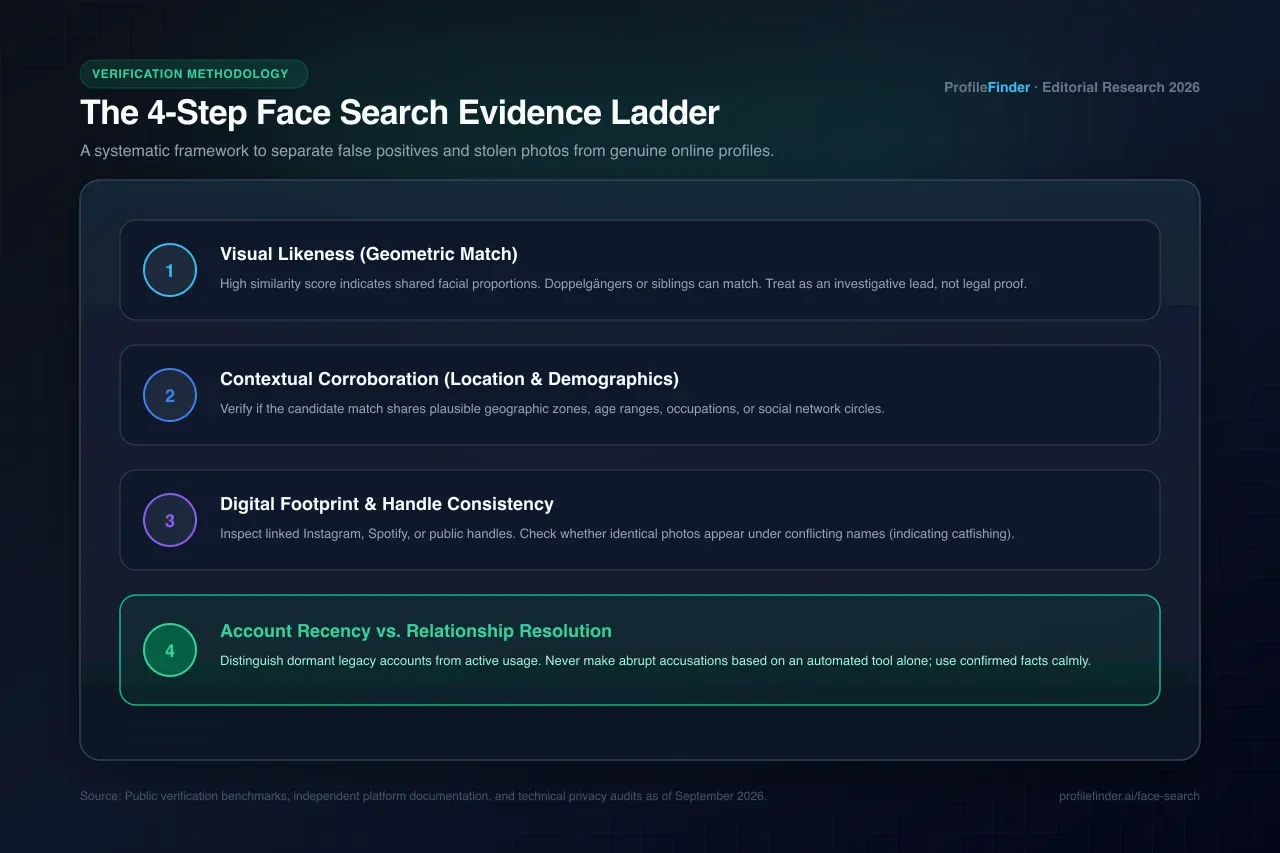
When evaluating an online dating match or verifying an unconfirmed contact, follow this 4-step investigative workflow:
Step 1: Check for Exact Duplicates: Start by running the profile photo through Google Lens or TinEye to see if it originates from stock libraries, Instagram influencer galleries, or Pinterest boards.
Step 2: Run a Biometric Face Search: If no exact match is found, upload a clear front-facing portrait to ProfileFinder Face Search to identify if that same face appears across public web sources under different names or handles.
Step 3: Cross-Reference Demographics: If a visual candidate is found, compare geographic location, stated age, and social circles before making assumptions.
Step 4: Request Real-Time Verification: Before meeting or investing emotionally, arrange a live video call or ask for a simple, natural photo holding up a specific gesture.
⚖️ Technical Limitations & False Positive Risks
Responsible digital research requires understanding that automated software cannot replace critical judgment:
Visual Likeness Is Not Legal Identity: Lookalikes and family members can produce elevated similarity scores.
Stolen Photos (Catfishing): If a photo matches an active profile under a different name, the person you are speaking with may be a victim of image theft rather than the creator of the account.
Account Dormancy: A discoverable profile on a public index does not prove active present-day usage. Profiles often remain cached long after abandonment.
❓ Frequently Asked Questions
Is Sherlock Search free to use?
Some basic photo search apps offer free initial queries, but full report details, unblurred results, or deeper scans typically require purchasing in-app credits or auto-renewing weekly subscriptions.
What is the best alternative to Sherlock Search in 2026?
For facial recognition and dating profile checks, ProfileFinder Face Search provides the most reliable alternative with direct credit card billing and privacy-focused processing.
Can Sherlock Search find someone on Tinder or Bumble?
No. Generic photo apps do not have access to closed dating application databases. They can only index images that have been published on publicly accessible web pages.
How does reverse face search differ from Google Lens?
Google Lens matches pixel patterns and duplicate files. Reverse face search maps geometric facial landmarks (distance between eyes, nose contour), allowing it to identify the same individual across entirely different photographs.
Does ProfileFinder store my uploaded photo?
No. Uploaded photos are processed in temporary browser sessions to compute search parameters and are never archived in public facial directories.
Is it legal to search someone's photo online?
Yes. Searching publicly available web information is legal. However, using public information for harassment, stalking, or extortion is strictly unlawful.
What should I do if a search returns a match on an adult site?
Do not jump to immediate conclusions. Scammers frequently steal legitimate social media selfies and repost them onto unauthorized adult platforms or spam directories without the subject's knowledge.
Will the person know I searched their photo?
No. Reverse face search queries on ProfileFinder are 100% anonymous and leave no digital traces on the target subject's profiles.
What photo quality works best for facial recognition?
A well-lit, unobstructed front-facing portrait of at least 200×200 pixels with both eyes clearly visible yields the highest match accuracy.
How do I cancel recurring subscriptions from mobile search apps?
If you purchased through Apple App Store or Google Play Store, manage your subscriptions directly in your device account settings under Subscriptions to disable auto-renewal immediately.