Can You Search People on Tinder? Free Methods & Limits (2026)
Ethan BrooksEditorial Researcher — Dating App Search & Digital Identity
Published Updated
A Tinder profile lookup starts with the information you already have: a name, a photo, a shared link or an existing match. Free checks can uncover a useful lead. The quickest route depends on that starting point, rather than on a tool promising to find everyone.
If you already know a first name, approximate age and city, you can start a focused Tinder Profile Lookup. If you want to try the manual routes first, work through the methods below in order of the information available to you.
Editorial disclosure: ProfileFinder publishes this guide and offers a separate dating-search service. The methods below are explained from their available features and official documentation, not a measured accuracy contest.
Quick Answer
You can look for clues to a Tinder profile for free through an existing match, a profile link, ordinary web search or a photo check. Tinder itself does not offer a directory where you enter a person's name. Its newer Search feature finds people by interests. Choose one method, inspect the original result, then decide whether another step would add useful information.
Choose a Tinder lookup method by the information you have
Starting point
First method to try
Account or payment
What to examine
An existing Tinder match
Your match list and conversation
Your own Tinder account
The profile attached to that conversation
A shared profile link
Open the exact link
Access depends on the link
The destination and information currently displayed
A name or public username
Targeted Google search
Free
The original indexed page, rather than its snippet alone
A photo
Google Lens or reverse image search
A free starting method
Where the image appears and who published it
A name, age and city
A dedicated dating-search service
Compare the selected offer
Included service, source information and billing terms
How Tinder Profile Lookup Tools Actually Work
The label covers several different jobs. A web search finds indexed pages. An image search looks for copies or similar pictures. A dating-search service accepts criteria for a particular person. An identity-search provider may work from contact details or public records. Their results answer different questions, so compare the method before comparing the brand.
For example, finding a familiar photograph on a public website can help explain where the picture came from. It does not tell you who is operating a Tinder account. Likewise, a name and city can narrow a request while still describing several people. Keep the original page and the observation date with each useful result.
Tinder Profile Search: Free Methods and a Dedicated Lookup
1. How to Run a Tinder Profile Lookup With ProfileFinder
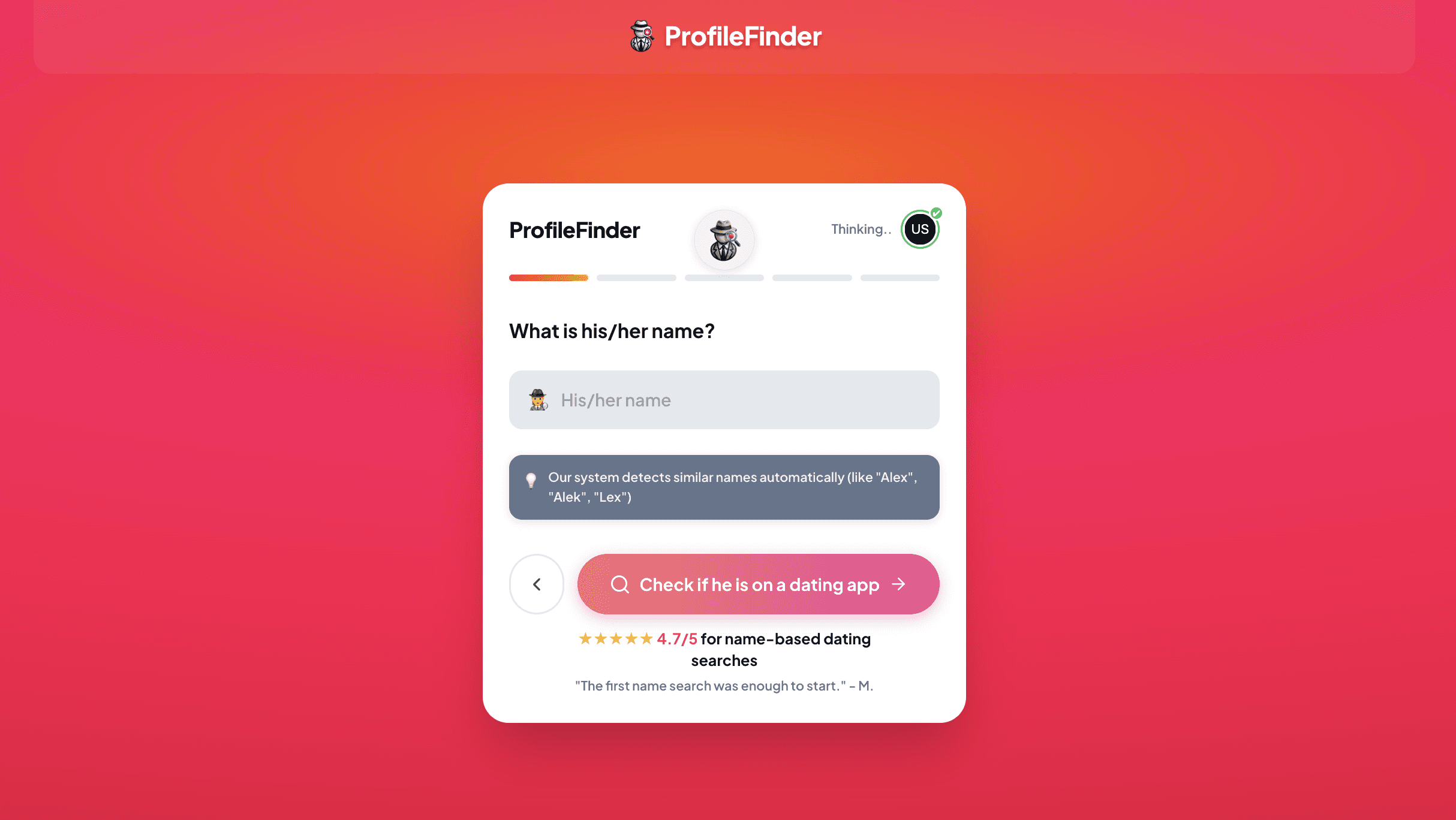
When you have a first name, approximate age and city, a dedicated search gives those details a clear starting place. ProfileFinder lets you begin in your browser without setting up a personal Tinder profile or handing over a Tinder password.
Enter the name you know. Use the name the person normally goes by. If you are unsure about a nickname, keep that uncertainty in mind when reviewing the request. An uncertain starting detail should not become a confident conclusion later.
An existing capture of the first-name step. The screen illustrates the input workflow; presentation may change.
Add age and city. Use an approximate age and a relevant city you already know. If the person recently moved, record that difference rather than assuming any location will describe the same situation. Your entered criteria help you understand exactly what you asked the service to do.
Review the selected offer. You can start the flow before choosing paid access. Check what the offer includes, its price and any renewal terms before proceeding. This keeps the practical comparison focused on the service you would actually receive.
Read the report with its labels. Distinguish source-backed information from AI-generated illustrations. Use the origin and date of an item when deciding what it tells you. This one check is more useful than judging a result by an app logo or a realistic-looking image.
If your question extends beyond Tinder, compare the broader dating profile search options. Choose the scope that fits the question you are trying to answer rather than paying for extra platforms by default.
2. Start with your existing match or conversation
If you previously matched with the person, open that conversation in your own Tinder account and inspect its attached profile. This is a more direct starting point than searching the web for somebody whose account you have already encountered. Note the details actually shown, including the name, photographs and bio.
If the conversation has disappeared, record that as an unanswered question. A missing match is not a reliable explanation of what happened to the account. Avoid buying a supposedly universal account-recovery tool based on that absence alone. For a new connection, the straightforward next step is often asking the person to share their profile.
3. Open a Tinder profile link you already have
Use the exact link the person shared with you, or one they deliberately published on a public page. Check the destination before entering credentials: a genuine-looking name in a page title is not enough. If the browser asks you to sign in, use Tinder's own app or website.
You may encounter older addresses written as tinder.com/@username. Treat one as a link to test, not a promise that every Tinder member has a working public username page. A handle from Instagram or another service is only a candidate; the same spelling may belong to someone else or lead nowhere.
If the page opens, compare several details with what you already know. If it fails, save the URL and stop treating it as a live result. A broken or unavailable link tells you about that address at that moment. It does not establish whether the person has another account.
4. Search Google by name, city or a known handle
Start with a narrow query. Replace the examples below with information you already know, rather than adding private details gathered from unrelated sources:
site:tinder.com "First Name" "City"
site:tinder.com "knownusername"
"knownusername" "Tinder"
Try the first name without the city if a person may have moved or the location was never published. Try a familiar nickname separately. Change one detail at a time so you can see which version produced a result. Large lists of speculative spellings usually make the search harder to interpret.
Open each promising page. Check that it refers to Tinder and to the right individual, rather than a blog post, a different social account or another person with the same name. Search snippets can retain text after a page changes. Keep a copy of the address and note whether the underlying page still supports the snippet.
This is useful when a relevant page has reached Google's index. It is not a searchable copy of the whole app. If a few sensible variations return nothing, move to a different starting point instead of treating repeated empty searches as stronger evidence.
5. Check a profile photo with Google Lens
A photograph is especially useful when your question is whether a picture has been reused. On a computer, open Google, choose the camera icon and upload the image. On a phone, open Lens through the Google app and choose the picture. Google's image-search instructions explain the available routes.
Start with the complete image, then try a crop if the background dominates the results. Inspect pages showing a convincing copy or a recognizably related photograph. A lookalike face, a similar outfit or a stock-photo layout is not enough. Check the publisher, the surrounding text and whether the page remains accessible.
A useful finding could be the same picture in a portfolio, an older public account or a stock-image collection. Each suggests a different follow-up question. A reused photograph might also belong to somebody being impersonated, so distinguish the person pictured from the person operating an account.
For a separate face-led investigation, open-web face search compares possible public appearances. Keep that task separate from a name-based dating request. A photograph found on the web is a lead to inspect, not a timestamp for someone's Tinder activity.
6. Use your own Discovery preferences for a manual check
If you already use Tinder, open your profile, go to Settings and review Discovery. Tinder's Discovery guidance explains the age and distance preferences. Use ordinary recommendations as they are presented in your account; changing a preference does not turn the feed into a name search.
This method suits someone who is already using the app and wants to review their own recommendations. Browsing every possible card is a poor substitute for an exact lookup, especially in a large city. An absent card leaves the question open because a feed is not a complete membership list.
Does Tinder's Search Feature Find a Specific Person?
Tinder describes Search as an interests-based feature being tested for eligible iOS users in selected markets. It looks for the type of person someone wants to meet. It is not intended to return an individual entered by name, age or social handle.
That distinction explains why advice saying “tap the search icon and type their name” can be misleading. Search, Discovery and looking through your existing matches are different activities. Our companion guide explains what Tinder Search actually allows; this page focuses on lookup methods and choosing between them.
Can You Search Tinder Without an Account?
You can run ordinary web and photo checks, open accessible links and start a separate search service without creating a Tinder profile. Those routes examine the information available to each method. They are useful starting points when joining Tinder is not what you want to do.
Using Tinder's own recommendations or match list is different: those are features of your own account. A website claiming to offer a free anonymous viewer should explain what it actually searches and what you receive. Look for that explanation before signing up, supplying contact details or paying to unlock a blurred presentation.
What About a Phone Number, Email or Username?
Tinder's person-search guidance does not provide a public phone-number or email directory. If a third-party tool accepts one of those inputs, ask what source connects it to a dating account. A result from a general people-search database may identify a contact record without establishing a Tinder profile.
A public username is different because it may appear on pages a person chose to publish. Search the exact spelling and examine the original destination. For phone-based questions, our guide to finding someone on Tinder by phone number covers the distinction between a contact clue and a dating-account result.
When to Move from Free Methods to a Dedicated Search
Move on when you have tried the methods that fit your information and a further search would answer a clear question. A name, age and city can support a dedicated request. A suspected stolen picture calls for image research. A link you already possess should be checked directly first.
Before comparing providers, write down your input, the result you need and the amount you are prepared to spend. Check source access, included services and renewal terms against that list. Our free alternatives to Cheaterbuster guide compares the starting methods; it is more useful than assuming “free” means a complete report.
How to Check a Possible Profile Match
Separate three questions: does the page belong to the person, is the information current, and what does it mean in context? Start with a distinctive combination of details. A familiar name helps, but several people can share a name, age and city.
Keep the original source. Save the URL and the date you viewed it. If you only have a screenshot, record where it came from.
Compare independent details. Look at the photographs, bio and known background together. Shared photos can also appear in impersonation.
Check recency separately. A page timestamp, search snippet or newly discovered image is not automatically the date the account was used.
Resolve the remaining question directly. Where appropriate, ask the person about the specific page instead of treating a lookup score as an answer.
Tinder's Recently Active indicator concerns activity within its stated window, and members can control its visibility. A copy of a green dot in an old screenshot tells you less than seeing the current context inside your own app.
Is Reddit Advice About Free Tinder Search Useful?
Reddit discussions can help you identify a method to investigate, especially when someone describes the exact steps and the date they tried them. Separate those details from a service recommendation, an affiliate link or an unsupported claim that one trick finds every account.
For r/Tinder discussions, look for an explanation you can check yourself. Suggestions involving a “viewer” extension or Tinder helper deserve a review of permissions and data access before installation. You do not need to hand over a password just to test a public link.
Frequently Asked Questions
What is the best free Tinder profile lookup method?
Start with your strongest existing clue. A conversation or shared link is more direct than a broad name search. With only a public photo, try an image check. The best first step is the one that gives you an original source you can examine.
Does an unavailable profile mean the account was deleted?
No. An unavailable page or an empty search result does not identify the reason. Tinder also lets members hide Discovery while keeping their account. See how pausing Tinder differs from deleting it before interpreting an absence.
Will a lookup notify the person?
Review the method and provider you are using. Opening public web material is different from sending a Like, message or follow request. Do not assume that every third-party viewer or browser extension behaves the same way.
What should I do after trying the free checks?
Keep the useful findings and leave unsupported conclusions aside. If you have a name, age and city and want to compare a focused offer, return to Tinder Profile Search. If nothing gives you a verifiable source, record the question as unresolved rather than buying repeated searches without a plan.