


An Instagram account has 8,400 followers today.
But how many did it have last week? Last month? And how many people started or stopped following during that period?
This is where Instagram follower count history becomes useful.
For creators and businesses, follower history can help evaluate audience growth. For personal accounts, it provides a clearer picture of changes than a single follower count.
However, there is an important limitation: Instagram doesn't provide a complete public historical database showing every account's follower count on every past date.
Here's what you can check, what you need to record yourself, and how follower monitoring works.
Quick Answer
To track Instagram follower count history, record an account's follower count at consistent intervals and compare those observations.
If you manage the account, Instagram Insights may provide audience growth information, depending on account type and available reporting periods.
For supported public profiles, a tool such as ProfileFinder Instagram Follower Tracker can monitor new and lost followers after a baseline has been established.
Historical records generally cannot be reconstructed for periods when no reliable data was collected.
1. What Is Instagram Follower Count History?
Follower count history is a record of how an Instagram account's audience size changes over time.
Rather than displaying a single number, it records multiple observations.
For example:
| Date | Followers | Net change |
|---|---|---|
| October 1 | 2,400 | — |
| October 8 | 2,455 | +55 |
| October 15 | 2,431 | -24 |
| October 22 | 2,510 | +79 |
These figures are illustrative.
A historical chart makes trends easier to recognize, including periods of growth, declines and unusual changes.
But a count is only part of the story.
2. Net Growth vs. New and Lost Followers
Suppose an account starts the week with 1,000 followers and ends with 1,020.
Its net growth is 20.
However, it might have gained 30 followers and lost 10.
Both situations produce the same final total:
Net follower change = followers gained − followers lost.
This explains why a simple count history can miss important activity.
Tracking individual changes provides more detail when reliable follower lists are available.
Why this matters for creators
A creator may see healthy net growth while also losing existing followers.
That doesn't automatically mean something is wrong, but it may justify reviewing content performance and audience retention.
Why this matters for businesses
If a campaign produces a temporary follower spike followed by a decline, a historical chart helps make the trend visible.
Follower count alone still doesn't measure sales, reach or engagement.
3. How to Check Your Own Instagram Follower History
If you manage a professional Instagram account, start with Instagram's native analytics.
Open your profile.
Access the professional dashboard or Insights, where available.
Find audience or follower statistics.
Select an available reporting period.
Review growth and loss metrics.
Record the results for future comparisons.
Availability and labels depend on your account type and Instagram's current interface.
This is a good starting point because the information comes directly from Instagram's own analytics.
However, it is not a way to see the names of every follower gained by another person's account.

4. How to Track Someone Else's Public Follower Count
For public accounts you don't manage, your options are more limited.
You can periodically record the publicly displayed follower count.
Choose a consistent interval, such as weekly.
Then save the date and count in a spreadsheet.
This gives you a basic history starting from the day you begin.
Example
If a public account has 5,000 followers on Monday and 5,100 the following Monday, the visible net increase is 100.
It doesn't tell you exactly how many individuals joined or left during the week.
Nor does it tell you why the number changed.
5. Step-by-Step: Monitor Follower History With ProfileFinder
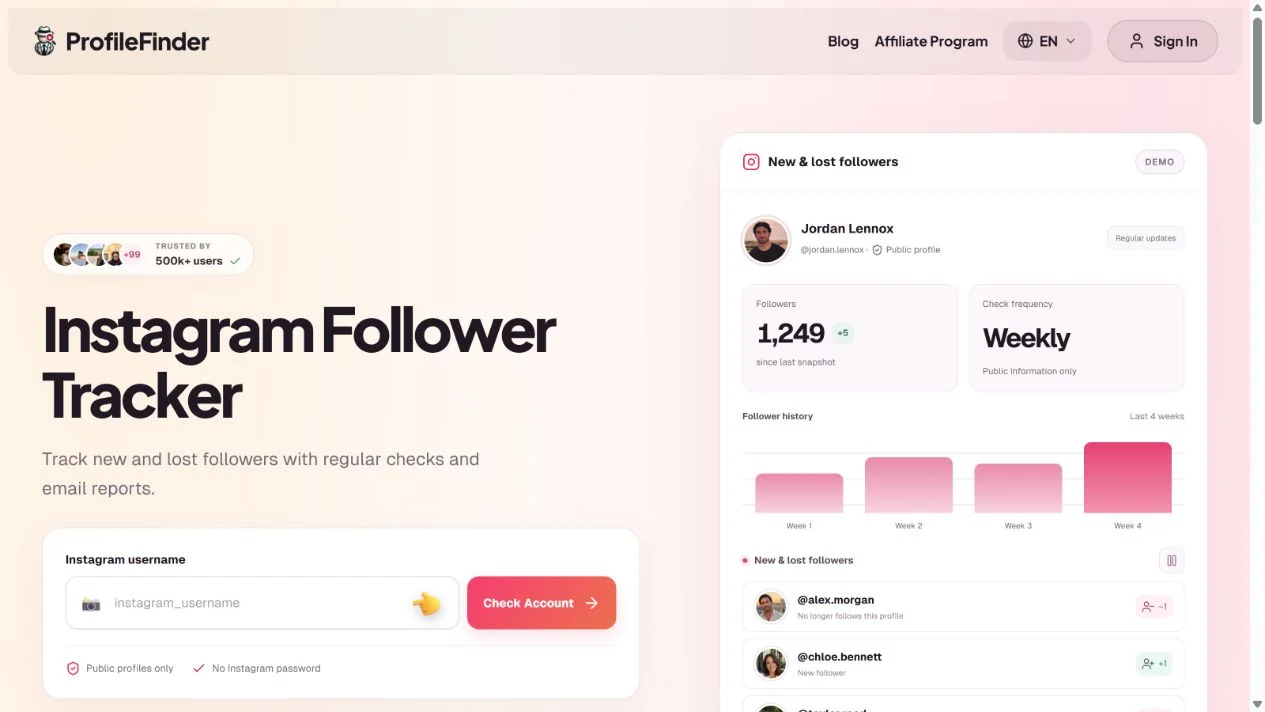
ProfileFinder Instagram Follower Tracker is designed to identify changes in follower lists rather than simply displaying one current count.
Step 1: Enter a public Instagram username
Open the monitoring tool and enter the account you want to track.
Step 2: Confirm the account is supported
ProfileFinder currently supports public accounts with fewer than 30,000 followers.
Step 3: Activate monitoring
The current price is $9.90 per week for one supported profile.
The first successful complete analysis establishes the reference follower list.
Step 4: Compare future observations
Later checks identify accounts newly appearing in or disappearing from the follower list.
Step 5: Review historical changes
The dashboard provides a view of recorded follower changes, with email reports for detected updates.
The history begins with successful monitoring data. It isn't a guarantee of complete activity before activation.
6. What Can Cause Follower Counts to Change?
Follower counts can move for many reasons.
Organic audience growth
New people discover the account through posts, recommendations, search or other channels.
Followers leaving
Some users simply lose interest or reorganize the accounts they follow.
Account deactivation or removal
Instagram account changes can affect the number of visible followers.
Platform enforcement
Spam-related removals or other platform actions may affect account counts.
Content and campaign performance
A successful campaign may coincide with follower growth, but a correlation alone doesn't prove causation.
When analyzing a trend, compare follower history with content publishing dates and other available metrics.
7. Can You See Instagram Follower Count History From Years Ago?
Sometimes historical data exists through previously collected records or analytics available to the account owner.
But there is no universal public feature that reconstructs complete follower counts for every Instagram account on any historical date.
Be careful with services advertising unlimited follower history without explaining where the data comes from.
If a monitoring service first recorded an account in October 2026, it can't simply assume an accurate daily history for January 2025.
Illustrative Example: What Four Weeks of Follower Counts Can Hide
The following is an illustrative dataset designed to explain follower analytics. It is not a record from a real Instagram account.
| Week | Starting Followers | New Followers | Lost Followers | Ending Followers |
|---|---|---|---|---|
| 1 | 2,000 | 42 | 17 | 2,025 |
| 2 | 2,025 | 31 | 28 | 2,028 |
| 3 | 2,028 | 60 | 22 | 2,066 |
| 4 | 2,066 | 24 | 39 | 2,051 |
After four weeks, the account has gained 51 net followers.
But the complete picture is different:
Total new followers: 157
Total lost followers: 106
Net follower growth: +51
Net growth relative to the starting count: 2.55%
A simple before-and-after count shows only the net increase.
A list-level tracker can reveal the individual additions and removals detected between observations.
How to Interpret the Numbers
Week 4 shows negative net growth despite the account receiving 24 new followers.
That doesn't automatically imply a content problem. The decline could reflect ordinary audience turnover, inactive accounts, account removals or other factors.
If you manage the Instagram account, compare follower trends against publishing activity and native Insights.
If you monitor a public account, remember that a snapshot tool can only analyze information available at the time of collection.
Count History vs. Individual Follower History
Count history measures changes in audience size.
Follower history tracks identifiable connections appearing or disappearing between snapshots.
For a detailed record of new and lost followers on supported public profiles, see ProfileFinder Instagram Follower Tracker.
The first successful analysis establishes the start of the monitoring history. It cannot retroactively create observations from months when tracking was not active.
Frequently Asked Questions
Can I see how many Instagram followers someone had last month?
Only if reliable data was collected or published for that period.
Can I see my Instagram follower history for free?
You may have access to native Insights, depending on account type, and you can maintain your own records in a spreadsheet.
Can I see who unfollowed an Instagram account last week?
Only if complete lists from suitable dates are available for comparison.
Does Instagram show the names of every follower lost?
Not as a complete historical log for ordinary users.
Can follower count history prove fake followers?
No. Unusual growth patterns can be a reason to investigate, but they don't prove that followers were purchased or automated.
Does ProfileFinder show exact follow timestamps?
Its Instagram monitoring detects changes between recorded snapshots, not necessarily the exact instant each event happened.
How often should follower counts be recorded?
Weekly records are useful for broad trends. Shorter intervals may reveal more detail, depending on data availability and your needs.
Final Verdict
Instagram follower count history helps turn isolated numbers into a meaningful trend.
For your own account, begin with Instagram's native analytics. For public profiles, consistent recording is essential.
If you also want to identify which followers were gained or lost, ProfileFinder Instagram Follower Tracker provides a more detailed monitoring approach for supported public accounts.
Related guides
- How Instagram Followers Order Works: Sorting Explained in 2026
- How to Compare Instagram Follower Lists and Find Changes in 2026
📝 Note at the End of This Article
Updated October 11, 2026. Instagram interfaces, tool features, prices and availability can change. Check the current details on the linked official product pages before subscribing. Comparisons use public documentation; we do not claim hands-on paid testing. Stock photos illustrate social media use, and tutorial captures are identified in their captions.